STENCIL.ONE
AI Storyboarding is Changing How Films Get Made
Learn how indie filmmakers can use AI to generate cinematic storyboard images in pre-production. No drawing skills or big budget required.
 Software version 1.1.1
How AI is Revolutionizing the Storyboarding Process for Independent Filmmakers
How the Best Filmmakers in the World Use Storyboards
That’s exactly why filmmakers like the Coen Brothers plan their shots so obsessively before they ever show up on set. No Country for Old Men, which won Best Picture at the 2008 Oscars, was storyboarded shot by shot by artist J. Todd Anderson. Every single setup was planned before a camera was even picked up. Or look at Christopher Nolan. Inception is a visual masterpiece, and yeah, meticulously storyboarded. Then you’ve got filmmakers like Ridley Scott, who goes so far as to storyboard his own films himself. Blade Runner is widely considered one of the greatest sci-fi films ever made, and Gladiator, also storyboarded by Scott, took home Best Picture at the 2001 Oscars.
The filmmakers who show up to set with the clearest vision are the ones who did the work before production began.
And the reason filmmakers lean on storyboards so heavily comes down to one simple truth. Film is a visual medium. So going straight from a written script to a camera is kind of a leap of faith. Sure, you can try to explain what’s in your head using words. But why would you, when you could just show people an image? A picture is worth a thousand words after all.
What Storyboards Actually Do for Your Production
So that’s where storyboards come in. They let you map out exactly how your scenes will play out, whether that’s on paper or digitally using online storyboarding software, before you ever pick up a camera. In our last tutorial we walked through how to do that using Stencil.
How to Use AI to Generate Cinematic Storyboard Images
But in this tutorial we want to take things a step further. Because here’s the thing, you no longer need to hire a professional storyboard artist or rely on your own questionable drawing skills to communicate your vision. You can now use AI to generate beautiful, cinematic storyboard images.
Imagine this. Your script is written. Your cast is selected. Your locations are locked. With just that information, here is what you can now do. You can upload a photo of your location, even if it’s a completely unlit, underwhelming reference shot. You can pair that with a photo of the actor who will be in the scene, literally any photo will do. And you can even throw in images of your props, wardrobe and hair choices on top of that.
You no longer need to hire a professional storyboard artist or rely on your own questionable drawing skills to communicate your vision.
Once all your reference images are uploaded, you just describe the shot you’re trying to create. Where the actors are placed in the scene, the time of day you’re planning to film, your lighting setup, color grading preferences, shot angle, lens choice, all of it. Then you hit generate. The AI takes everything you’ve given it, your reference images and your prompt, and combines them into a single beautiful image that actually communicates your vision for the scene. Way clearer than anything you’d get from a rough hand drawn sketch.
Step by Step: Creating AI Storyboard Images Inside Stencil
So let’s walk through how to do this inside Stencil. Once you’re logged in, go ahead and click on the sidebar link that says Media Reference. From there we’re going to create a new media reference image. There is a full dedicated tutorial on this tool linked below, but for now we’re just going to focus on the AI storyboard image side of things. Click this button here, and then select the option to generate a storyboard image using AI.
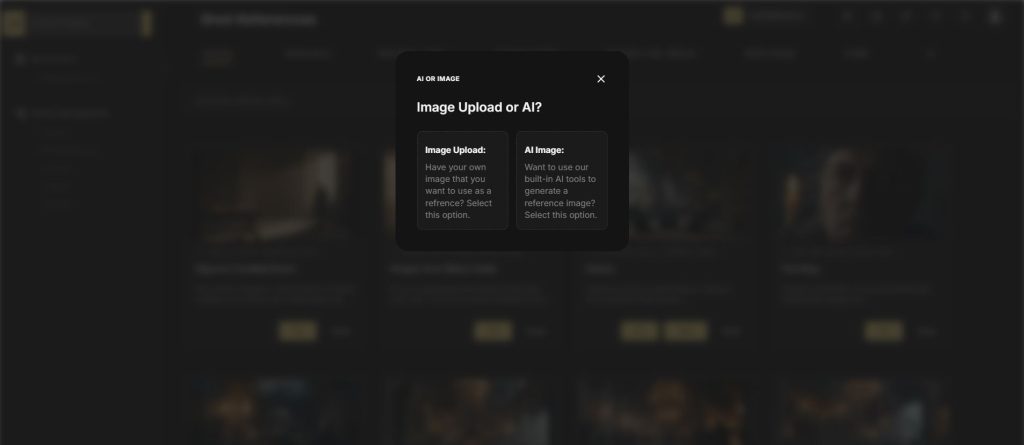
From here we’re going to start uploading the pieces of our scene. Drop in your location image, then an image of the actor who will be in the shot, and then any wardrobe or prop references as well. Once those are all in, we can move on to the text prompt.
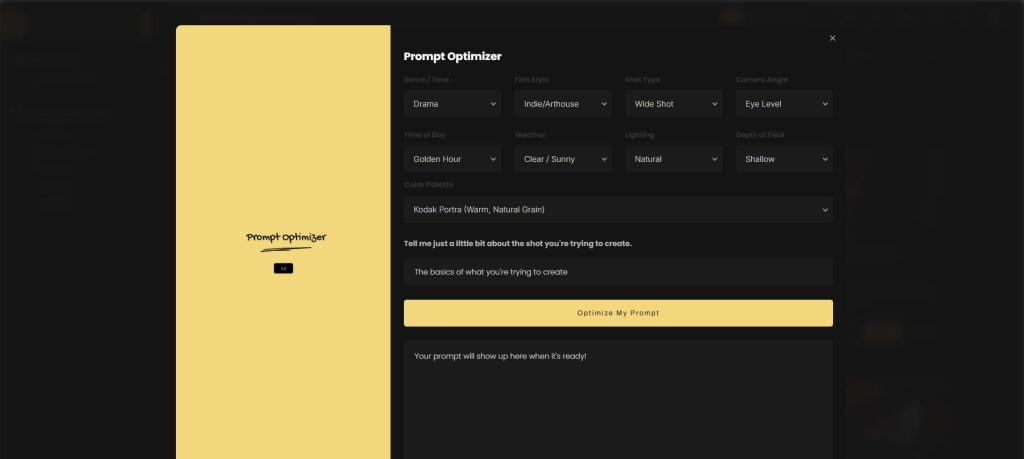
This is where it gets really useful. You’ll notice there’s a prompt optimization tool right here. This lets you build out a proper cinematic image prompt where you can dial in things like shot angle, time of day, weather conditions and so on, without having to write it all from scratch yourself. For this example we’ll set it up as a wide shot, at night, in Tokyo.
The prompt optimization tool lets you dial in shot angle, time of day, weather and more, without having to write a cinematic prompt from scratch.
Once everything is filled out, jump back to the main image generation page, paste the optimized prompt in, and hit generate. As you can see, the AI follows the brief pretty much to the letter. But let’s say there’s something you want to tweak. Maybe the shot size isn’t quite right, or you want to change the weather, or shift the color palette. All you have to do is go back into the prompt, find that specific detail, update it, and run it again. That’s what makes this so powerful. You get really accurate, granular control over every image you’re creating.
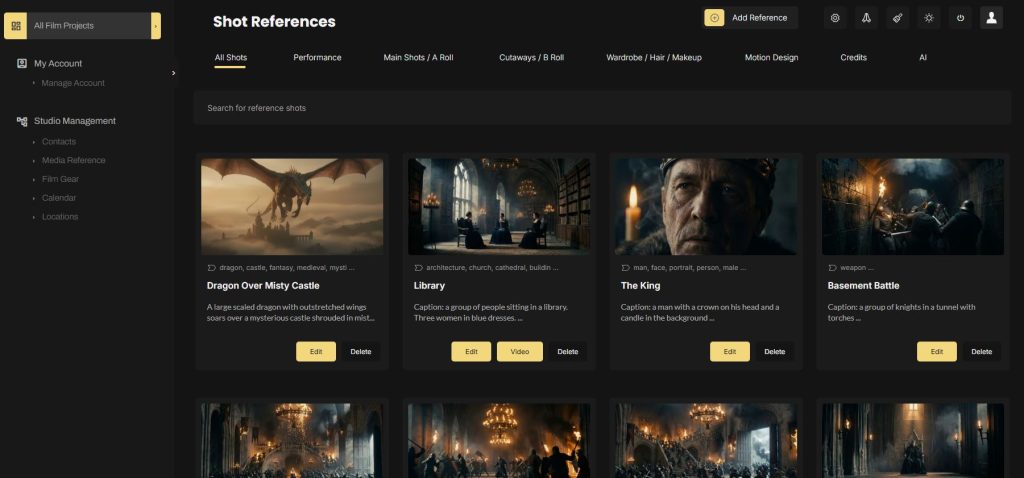
Works for Interior Scenes Too
Now that was an outdoor shot, but the exact same process works for interior scenes too. Got a scene set inside a dimly lit apartment, a crowded restaurant, a hospital room? Just upload your location, your cast, your wardrobe references, describe the shot and generate. The logic is identical.
Why This is a Big Deal for Independent Filmmakers
Take a step back and think about what this actually means for a second. Traditionally, if you wanted production quality storyboard images you had two options. You either hired a professional storyboard artist, which costs real money, or you sketched it yourself and hoped your team could decode what you were trying to communicate. Now you can do it yourself, at a fraction of the cost, with images that actually look cinematic. For independent filmmakers especially, that is a genuinely big deal.
Traditionally you either hired a storyboard artist or sketched it yourself and hoped your team could decode it. Now there is a third option.
If you want to try out the AI storyboard tool we used in this tutorial, you can sign up for Stencil here.
All-In-One Film Production Software
Stencil comes will all of the tools you need to manage your film production studio. We help you manage storytelling, budgeting, casting, location scouting, storyboarding and so much more!
Software version 1.1.1

A software solution designed to help filmmakers complete compelling stories.
Version 1.1.1
USE CASES
Feature Films
Documentaries
Shorts
Music Videos
Commericals
Fashion Films