STENCIL.ONE
The Smarter Way to Manage Filming Locations
Finding a great location is only half the battle. The real challenge is keeping everything organized once you have it.
 Software version 1.1.1
Your next location scout just got a lot easier
And in the world of filmmaking, locations can be one of the hardest studio assets to manage. A single location can have hundreds of photos, each needing to be properly documented. Your cinematography and design teams need access to floor plans. Production needs to know where the nearest parking, medical centers, and restaurants are. And your entire cast and crew needs to see at a glance where every location sits on a map.
And that’s just scratching the surface.
In this tutorial, I’m going to show you how to manage your locations inside Stencil so you can bring order to all of that complexity.
How Location Management Works in Stencil
Once you’re logged into Stencil, the first thing to understand is that locations live in the left sidebar of your main projects page, and these are global locations.
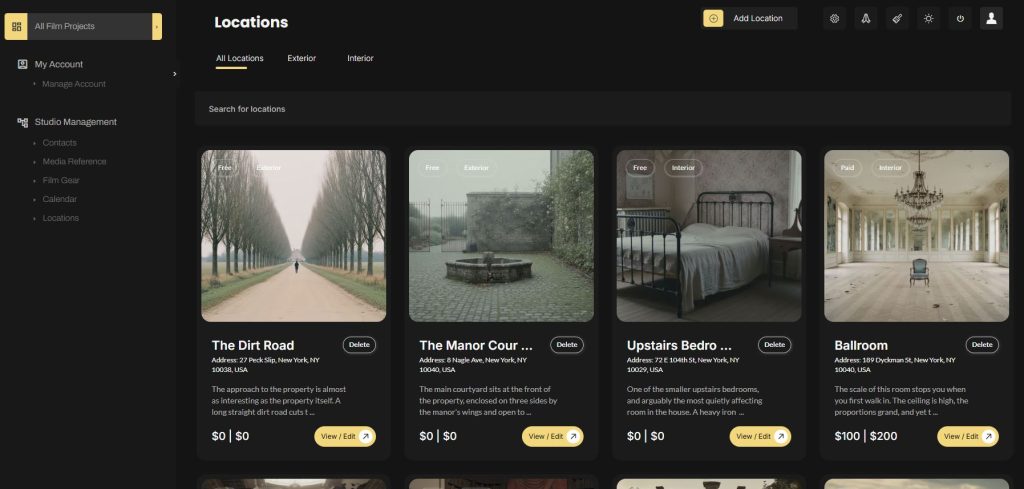
That means when you first add a location, it isn’t assigned to any specific project. It lives at the studio level and can be linked to any project you want, even multiple projects at once.
It’s not uncommon for film production companies to re-use locations across different projects. Add it once, use it everywhere.
Think of everything on your main locations page — contacts, reference media, location profiles — as studio assets. As your production company grows, so does your catalog. Whenever you scout a new location, you simply add it here and it becomes part of your permanent library.
How to Link Locations to a Specific Project
To link a location to a project, head to your main projects page and click into the project you’re working on. Scroll down and you’ll find the locations map section. If it’s a brand new project, this will be empty. To populate it, click ‘add locations’ and a popup will appear showing every location in your global database.
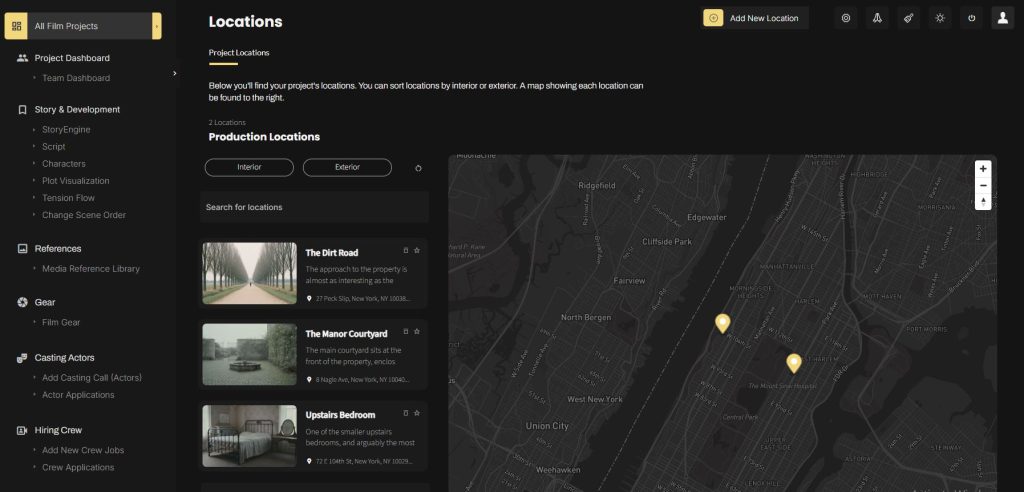
Click the icon next to any location and it will be mapped to that project, showing up on the map below with a pin representing its address. You can click any pin or location card to update the details at any time.
One important thing to note: if you remove a location from a project by clicking the trash icon, it only unlinks it from that project. It stays in your global database and can be reused in any future project.
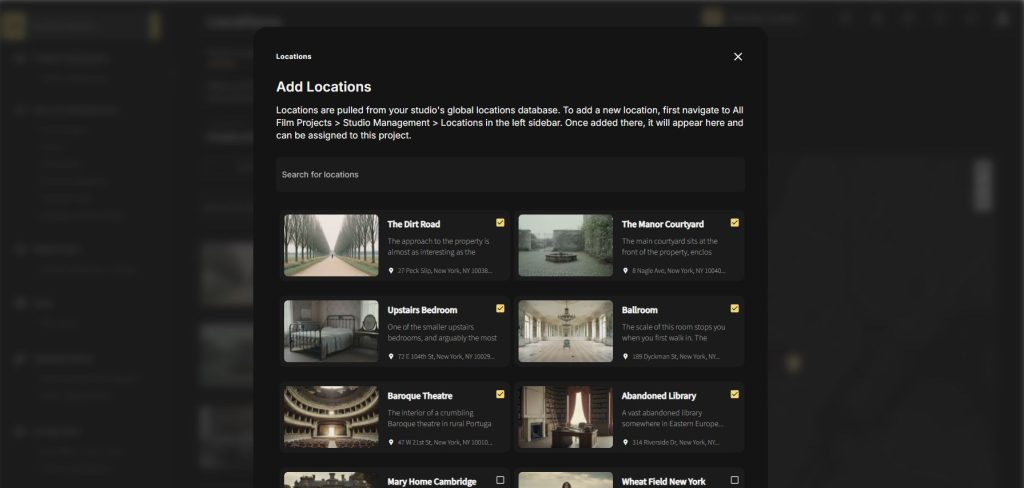
How to Add a New Location to Your Database
To add a new location, head back to your main projects page and click on ‘locations’ in the sidebar. From there, click ‘add a location’ and a popup will open asking for the basics — name, address, whether the location is free or paid, and if paid, the minimum and maximum price range. Those price values show up on the location card so you have a bird’s eye view of cost across your entire catalog.
You can also tag whether it’s an exterior or interior location and specify the location type, whether that’s a home, hotel, park, warehouse, and so on.
Filling out these details is valuable because it allows you to search your location catalog more effectively — and that matters a lot once your database starts to grow.
Once you’re ready, click ‘add new location’ and the location will be created and added to your global library.
Building a Full Location Profile
After a location is added, click ‘view / edit’ to open its full profile. This is where things get powerful. Each location profile has dedicated tabs for photos, floor plans, contacts, video, parking, services, docs, and a map view.
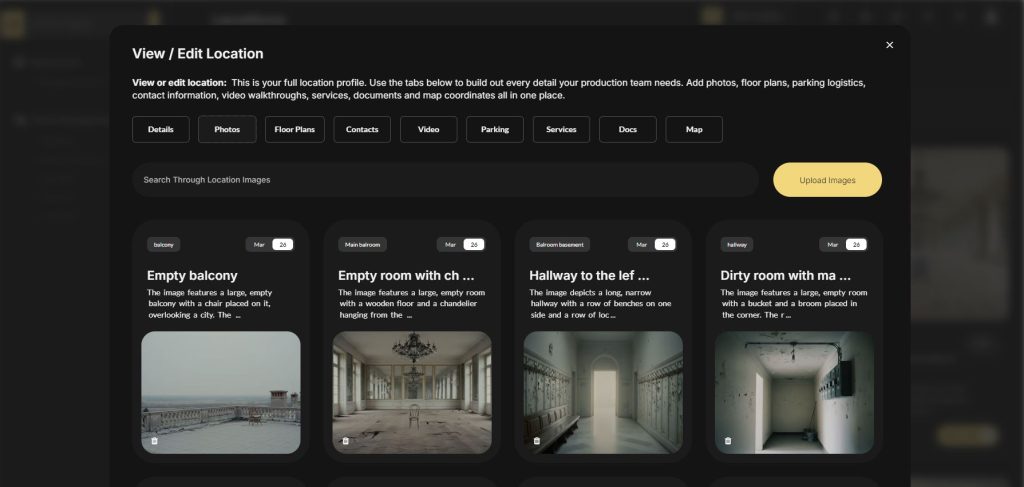
How AI Automatically Documents Your Location Photos
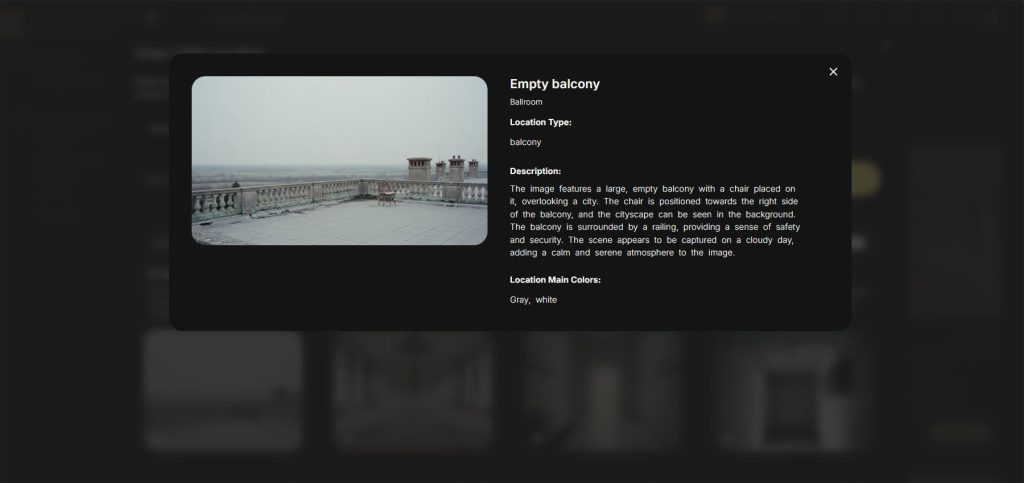
The photos tab is one of the most useful features in Stencil’s location tool. Upload photos from your scout and the AI will automatically name, describe, and tag each image — including pulling out the location’s color palette.
This matters more than it might seem. Imagine having a thousand locations in your database and trying to track down that one with the yellow kitchen, or the red bedroom, or that outdoor location heavy in browns. With AI tagging, you can search your entire catalog by name, description, location type, or even color.
The AI can be a huge time saver in terms of adding metadata to each image. And if it’s ever not quite right, everything is fully editable.
You can also bulk upload images rather than adding them one at a time, which makes documenting a large scout session much faster. Once uploaded, the AI processes each image in the background and populates the title, description, and tags automatically.
Everything Else Inside a Location Profile
Beyond photos, each location profile gives your team everything they need to fully understand a location before setting foot on it.
The floor plans tab is where your cinematography and production design teams can access the layout of the space. The contacts tab stores the owner, location manager, or any key person associated with that location. The video tab lets you upload a walkthrough or tour so your team can get a feel for the space remotely. Parking shows your primary, overflow, and large vehicle parking options nearby. Services lets you log the nearest hospital, clinic, pharmacy, and restaurant — the essentials every production needs on call. Docs is where you store any contracts, permits, or important paperwork tied to that location. And the map tab gives you a clean view of exactly where the location sits.
All of these things come together to give you and your entire team a deep, comprehensive understanding of every location in your catalog.
Start Building Your Location Library in Stencil
Location management is one of those things that seems manageable at the start of a production and becomes overwhelming fast. Having a system that keeps everything organized, searchable, and accessible to your whole team from day one makes a real difference when production days arrive.
The location tool is just one of many tools built into Stencil for filmmakers and visual storytellers. The platform also includes tools for story planning, shot lists, storyboards, plot visualization, casting, and much more.

All-In-One Film Production Software
Stencil comes will all of the tools you need to manage your film production studio. We help you manage storytelling, budgeting, casting, location scouting, storyboarding and so much more!
Software version 1.1.1

A software solution designed to help filmmakers complete compelling stories.
Version 1.1.1
USE CASES
Feature Films
Documentaries
Shorts
Music Videos
Commericals
Fashion Films